
The course: two levels, 38 lessons from the classroom
The lessons follow a language school's handouts page by page. Level 1 goes from “what is your name” to phone calls, reasons and reported speech; Level 2, the second book, from cooking and housework to the weather, the doctor, the bank and saying goodbye.
- A tab per level. Level 1 and Level 2 sit as tabs at the top of Lessons, each with its own count of lessons done and its own “Continue” panel. The level you picked stays picked.
- Words, phrases, rules. Every lesson has three tabs: the words with translations, the phrases with audio, and the grammar of the lesson explained in plain words with examples.
- Every row is a card. Tap a word or a phrase to open its full card: playback, syllable breakdown, examples, recording and the practice schedule. The speaker button says it right from the list.
- Status at a glance. A dot leads every row: new, learning or learned — so one look down the list shows what is still weak.
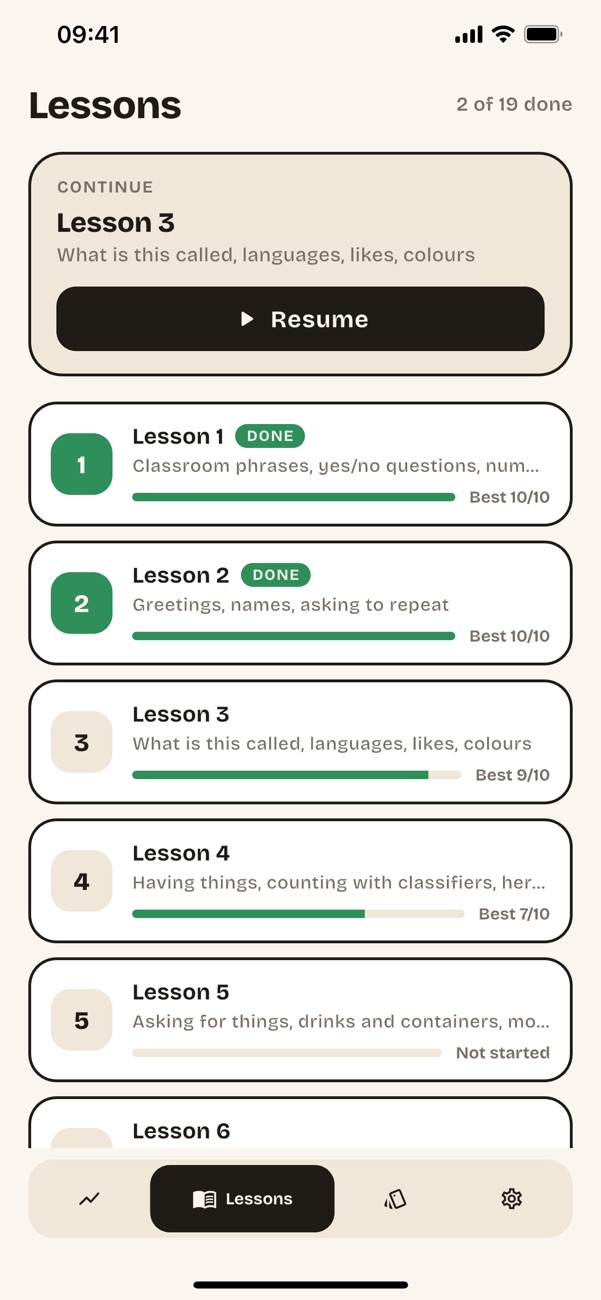
- Your next lesson. A panel always shows where to continue. Any lesson opens at any time; a finished one carries a tick and your best trainer score.
- Practise just this lesson. Run the flashcard practice on one lesson alone — its words or its phrases.
- Phrases that speak as you. Your name, your gender's polite particle (khráp, khâ or khá) and your pronoun (phǒm or dichán) go into the phrases and their audio.
The lesson trainer
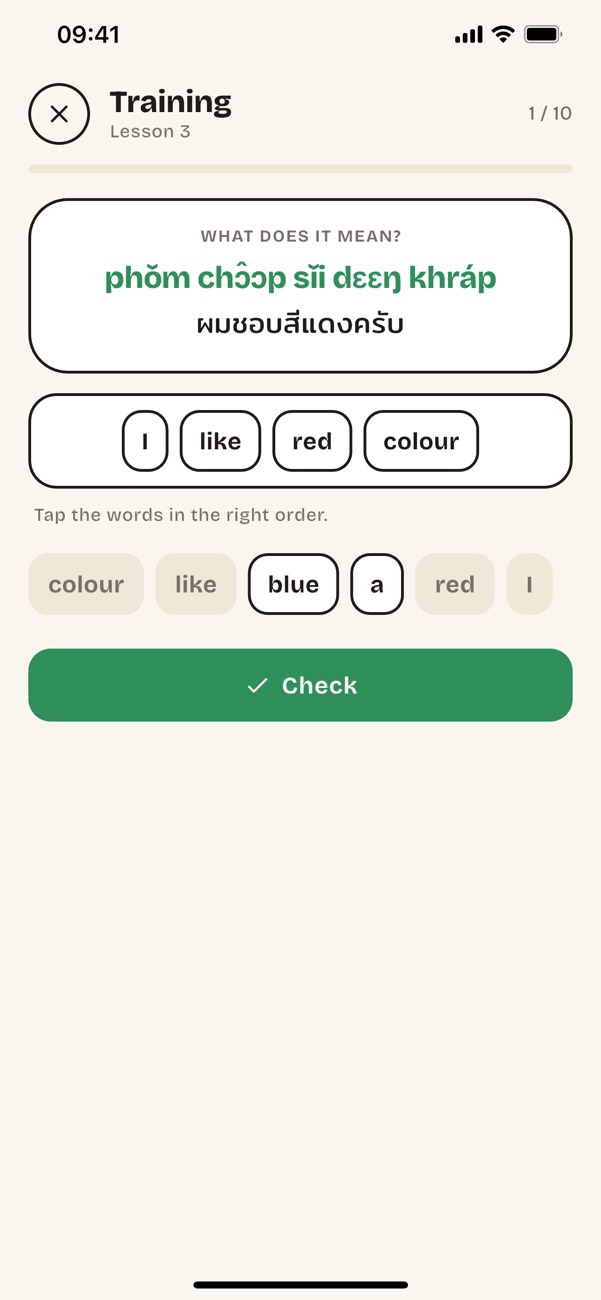
Ten exercises a run, drawn at random from a pool of thirty to forty per lesson. You build every answer from word tiles.
- Three kinds of task. Say it in Thai, tell what it means, or reply to a line of dialogue.
- A word bank with traps. Some tiles are extra — words from other phrases of the lesson and the other gender's particle — so you have to read them all.
- Mistakes come back. A wrong answer returns later in the run and leads the next one. The trainer remembers where it stopped, so a new run carries on with exercises you have not seen instead of reshuffling the same ones.
- A perfect run finishes the lesson. Your best score per lesson is kept and goes into the backup.
- Follows your level. In Advanced mode you build Thai answers from Thai-script tiles; Beginner keeps the romanisation.
Flashcards by topic
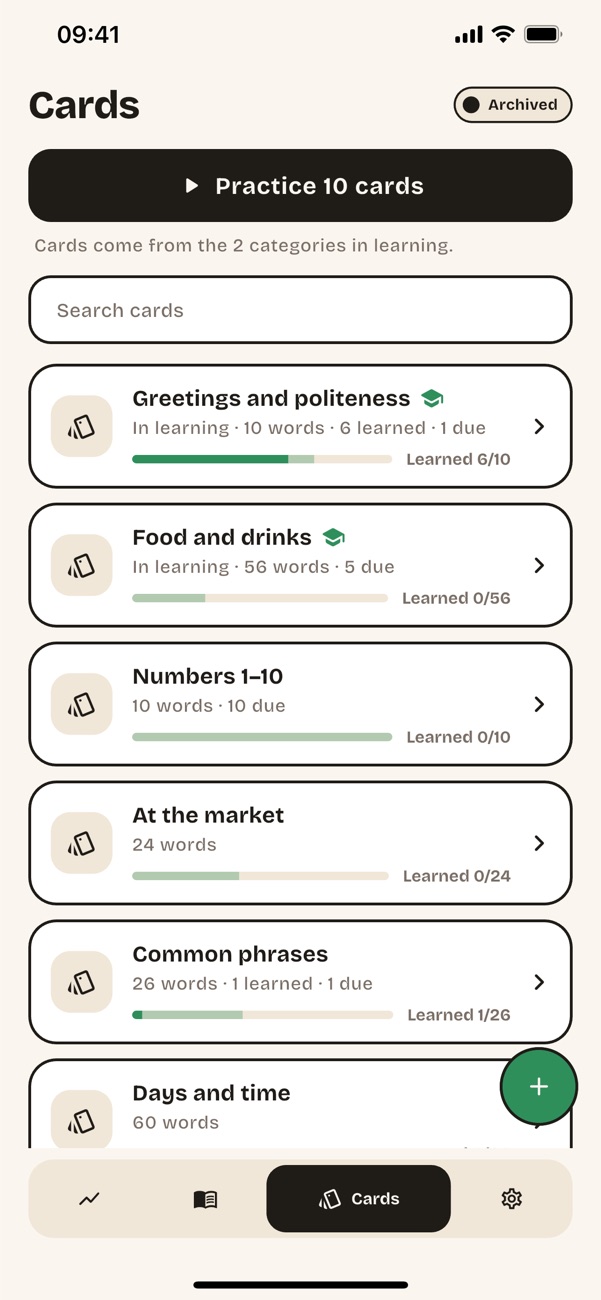
The whole vocabulary of the app in one place: 90 starter words plus every word of the course, filed by topic — greetings, numbers, food, market, time, colours, family, places in town, health and more.
- Phrase sets. Each lesson's phrases form a set named by what it teaches — “Telling the time”, “Asking for help” — worded for the speaker you chose.
- Progress on every category. A two-layer bar: what is learned, and what is under way — so it moves from your first answer.
- Swipe to organise. Swipe right to mark a category “In learning”, swipe left to archive it, rename it or give it an emoji. Hold to practise that category alone.
- Search. Find any card by its Thai, its pronunciation or its translation, across every category.
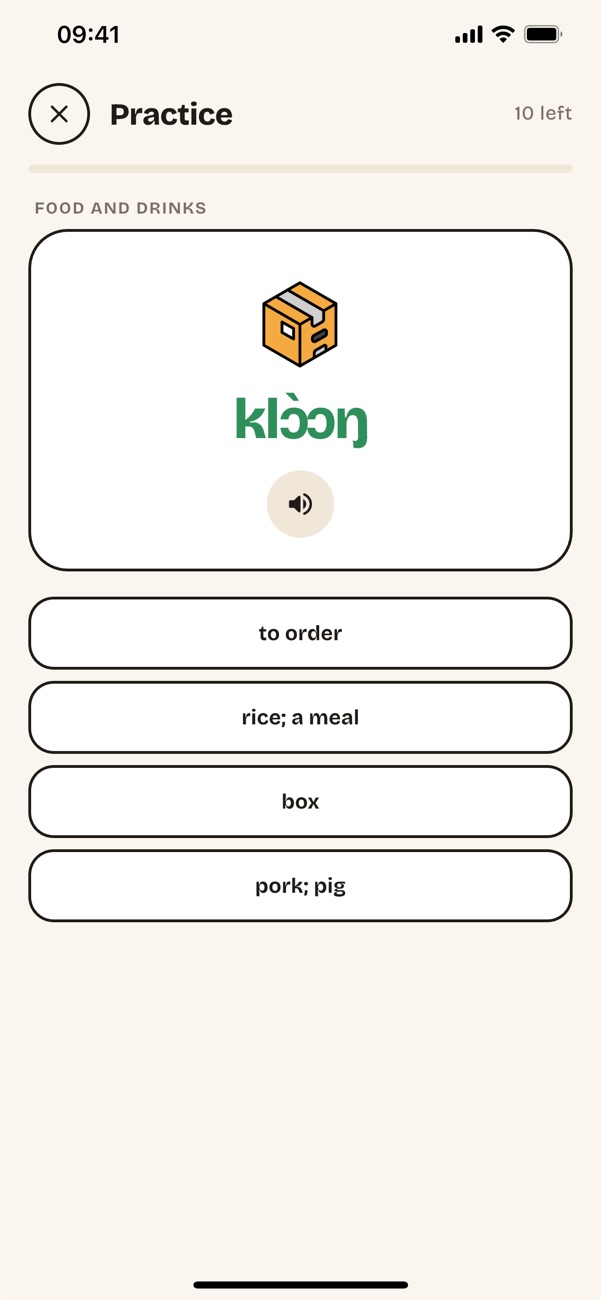
- Pictures. Cards carry a drawing or a photograph where one helps the word stick.
Spaced practice that adapts
A scheduler (FSRS) works out, for every card you have seen, the moment you are about to forget it — and brings it back then.
- One word, four answers. Multiple choice by default, with the translation shown after the pick. Prefer honesty over guessing? Switch to self-rating: Again, Hard, Good or Easy.
- New cards are introduced first. You meet a card before you are asked about it.
- Everything once before anything twice. A session covers the whole scope before repeating; often-missed cards come first, cards you always get right come last.
- Your direction. Thai → meaning, meaning → Thai, or mixed.
- Your pace. 10, 20 or 30 cards a session, from the categories you are learning, one category, or one lesson.
- A summary at the end. What you reviewed and what to revisit — with undo if your finger slipped.
The word card: see the tone, hear the tone
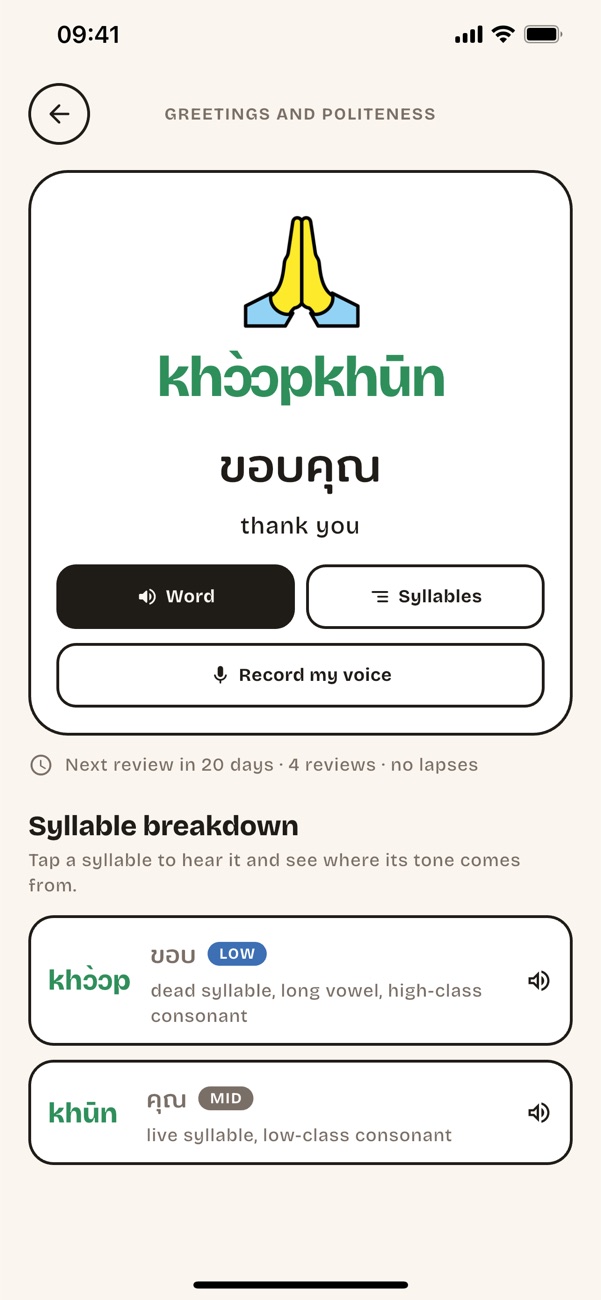
Every tone has its own colour everywhere in the app, so you see it before you hear it.
- Syllable by syllable. Each syllable with its tone and the reading rule that produces it: consonant class, live or dead syllable, tone mark. The explanation comes in your language.
- Word and Syllables. Hear the word whole, or piece by piece and slower. Audio is bundled for every word and phrase.
- Ten spoken examples. Ten phrases that use the word, each with Thai, pronunciation, translation and audio. Tap one to open it as a card.
- Record your own voice. Record, re-record or delete a take for any card, and pick which voice plays: the app's or yours.
- The schedule, in the open. When the card comes up next, how many reviews it has had and how often you missed it.
Your own cards and the tone keyboard
Heard a word in class or at the market? Put it on a card in seconds — even if you cannot spell it in Thai yet.
- Your categories. Create categories of your own and fill them with cards: Thai, pronunciation, translation and a note.
- A keyboard with all five tones. Type the pronunciation the way the school book writes it: every vowel in five tones, plus ŋ, ʉ, ɛ, ɔ, ə and the glottal stop.
- From sound to spelling. The app suggests the Thai spelling for what you typed, checked against a 62,000-word dictionary.
- From spelling to sound. Or type the Thai and get the pronunciation, with tones worked out from the spelling rules.
- Thai can wait. A card can be saved with just the pronunciation and a translation; the Thai can be added later.
- Full members. Your cards join practice, search, statistics and the backup like any other — and you can edit or delete them any time.
Rules by topic and the pronunciation guide
For when you remember the rule but not the lesson it was in.
- Every rule in one place. The grammar of all the lessons, a tab per level, sorted by topic — questions, numbers, time and so on — open from the home screen or from Lessons.
- Reading the pronunciation. A guide to the school-book romanisation (AUA / Haas): the five tone marks, vowel length, the special letters and how syllables are written.
- Sound hints you know. Every vowel and tricky consonant is compared with a familiar sound — “ee” in see, “ng” in sing.
- One colour code. The guide uses the same tone colours as the cards and the syllable breakdown.
Statistics without the guilt
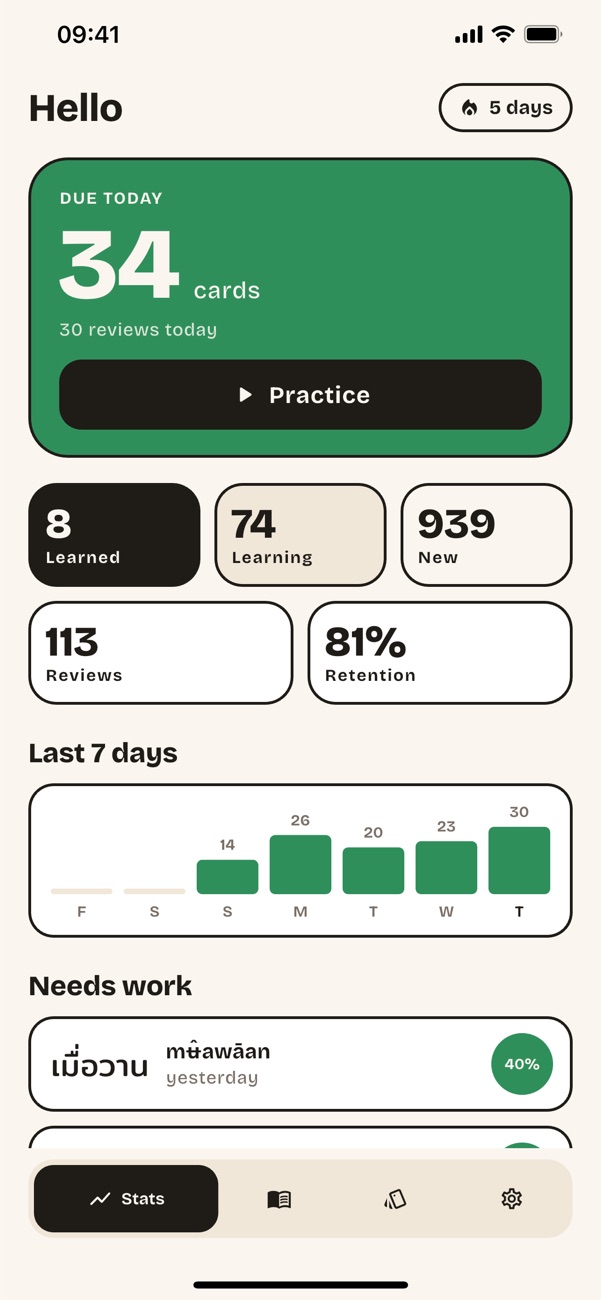
The home screen tells you what is due and how you are doing — and nothing else.
- Due today. The cards the scheduler wants you to see now, one tap away.
- Learned, learning, new. Where the whole vocabulary stands.
- Reviews and retention. How much you answered this week and how much of it you got right.
- Your week and your streak. Activity for the last seven days and the run of days in a row.
- Weak words. The cards you miss most often, listed so you can open and fix them.
Settings
One screen, six groups — and each switch changes how the course talks to you. Here is every one of them.
Language
- System, English or Russian. The interface, the translations, the lessons, the rules and the guide all switch together.
Playback
- Play word on open. Say the word as soon as its card opens.
- Play during training. Say the card in practice and the phrase once you check it in a lesson. Off, sound plays only from the buttons.
- Record my voice on cards. Offer the recorder on every card. Your own cards always have it.
- Word pictures. A picture on the card and in practice, for the words that have one — or plain text only.
Reminder
- Daily reminder. One notification a day, at the time you choose, so the due cards do not pile up.
Learning
- Learning mode. Beginner leads with the pronunciation, Advanced with Thai script. Lessons, cards and the trainer follow.
- I am: a man / a woman. Your sentences end with khráp, or with khâ and khá — in every phrase, its audio and the trainer.
- My name. Used in phrases such as “my name is …”. Leave it empty for a sample Thai name.
- Record my name. The phrase is spoken syllable by syllable, and the name in your own voice.
- Answering. Multiple choice out of four, or self-rated: reveal the answer and rate how well you remembered it.
- Show new cards first. See a never-seen card in full once before it is tested.
- Practice direction. Thai → meaning, meaning → Thai, or mixed.
- Cards per session. 10, 20 or 30.
Help
- Reading the pronunciation. The guide to tones, vowel length and the special letters.
- Show the hints again. Every screen explains itself on the first run; this brings the tips back.
- Privacy policy. The whole text as a screen in the app, readable offline.
Data
- Backup: export and import. Your cards, category edits, settings and practice history as one file. Import shows what is inside before it replaces anything.
- Reset progress. Erases every review and schedule; cards and categories stay.
- Picture credits. The source and licence of every drawing and photograph.
Offline, and your data stays yours
The app makes no network requests at all — not for sign-in, not for analytics, not for anything.
- Everything is inside. The course, the dictionary and every audio file ship with the app. It works on a plane and on an island.
- No account, no ads, no analytics. There is nothing to sign up for and nothing watching you learn.
- A backup you own. Your cards, category edits, recordings, settings and practice history export as one file, and import back on any phone.
- Permissions only when used. The microphone for “Record my voice”, notifications for the reminder you switched on. That is all.
- Reset when you want. Start the schedule from scratch without losing your cards and categories.
- The policy is in the app. The privacy policy is a screen in the settings, readable without a connection.